> For the complete documentation index, see [llms.txt](https://docs.akenza.io/llms.txt). Markdown versions of documentation pages are available by appending `.md` to page URLs; this page is available as [Markdown](https://docs.akenza.io/device-management/rule-engine/rule-actions.md).

# Rule Actions

What a rule does when its condition is true.

An **action** runs when the [logic block](/device-management/rule-engine/logic-blocks.md) it is linked to evaluates to true. A rule can have several actions, and a saved action can be reused in other rules.

Rule actions use the same output connectors as [data flows](/device-management/your-data-flow.md), plus downlinks:

<table data-view="cards"><thead><tr><th></th><th></th><th></th><th data-hidden data-card-target data-type="content-ref"></th></tr></thead><tbody><tr><td><i class="fa-bell">:bell:</i></td><td><strong>Notifications</strong></td><td>Alert users by email, SMS, Microsoft Teams, or Slack.</td><td><a href="/device-management/your-data-flow/connectors/notifications.md">Notifications</a></td></tr><tr><td><i class="fa-arrow-right-arrow-left">:arrow-right-arrow-left:</i></td><td><strong>Streaming</strong></td><td>Forward data to a webhook, a message broker, or a cloud service.</td><td><a href="/device-management/your-data-flow/connectors/streaming.md">Streaming</a></td></tr><tr><td><i class="fa-database">:database:</i></td><td><strong>Databases</strong></td><td>Store data in the akenza DB or an external database.</td><td><a href="/device-management/your-data-flow/connectors/databases.md">Databases</a></td></tr><tr><td><i class="fa-tower-broadcast">:tower-broadcast:</i></td><td><strong>Downlink</strong></td><td>Send a command or configuration to a device.</td><td><a href="/device-management/rule-engine/rule-actions/downlink.md">Downlink</a></td></tr></tbody></table>

The content an action sends can be customized with [payload templating](/reference/message-templating.md), for example to include the value that triggered the rule.

## akenza DB action

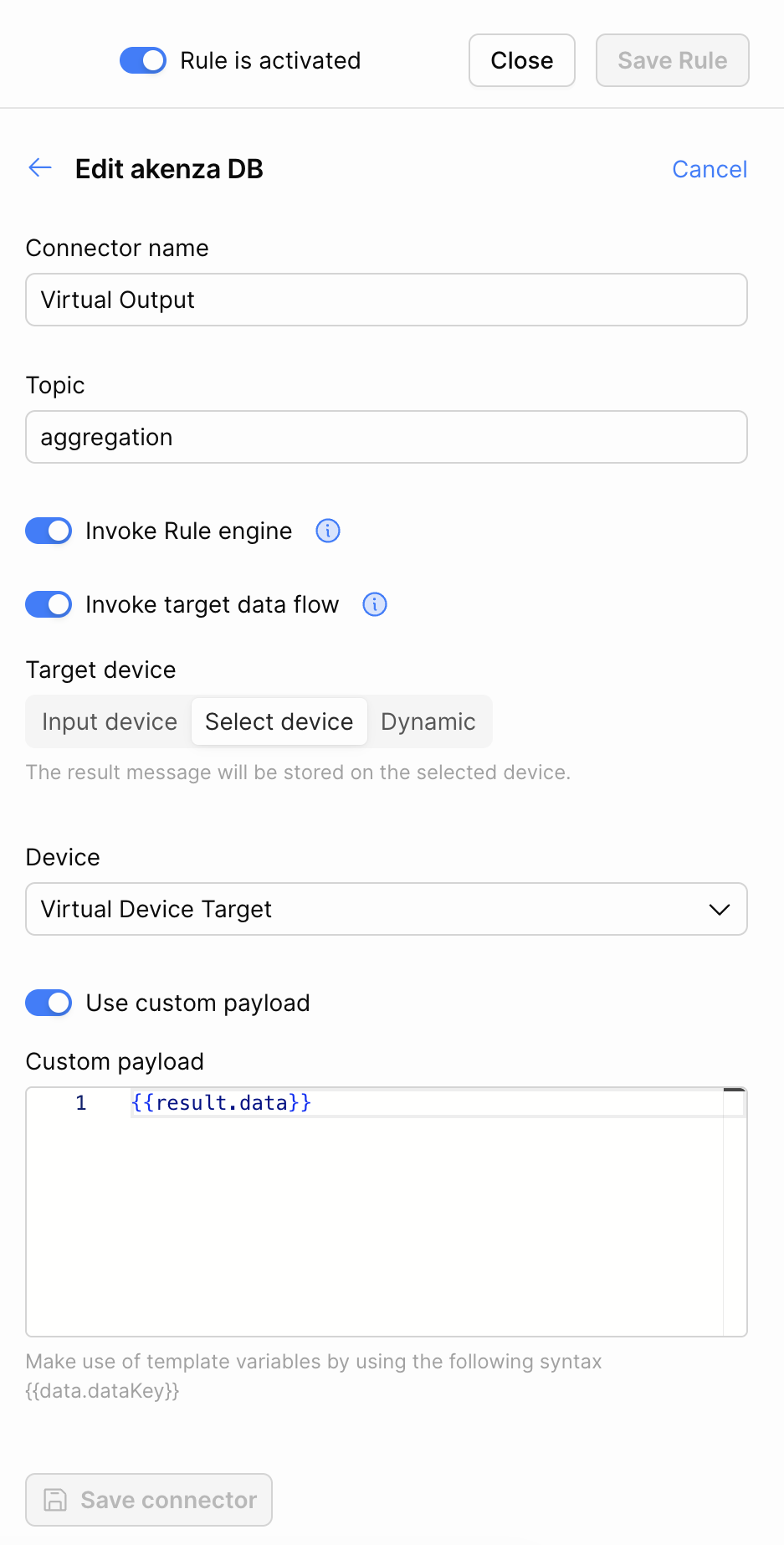
The **akenza DB** action of a rule stores the rule result as a message on a device. It has two options that pass the result on, which are only available on this action.

<figure><img src="https://2165942204-files.gitbook.io/~/files/v0/b/gitbook-x-prod.appspot.com/o/spaces%2F-MMKXTFIN5ZlLOjBlfC4%2Fuploads%2Fgit-blob-2b91a9672f05113a57096b2156172295db2fcd06%2Frule-action-akenza-db.png?alt=media" alt="The akenza DB rule action with connector name, topic, the Invoke Rule engine and Invoke target data flow toggles, the target device options, and the custom payload toggle"><figcaption><p>The akenza DB rule action</p></figcaption></figure>

<table><thead><tr><th width="220">Field</th><th>Description</th></tr></thead><tbody><tr><td><strong>Topic</strong></td><td>The topic of the stored message.</td></tr><tr><td><strong>Invoke Rule engine</strong></td><td>Evaluate the rules again with the stored message. See <a href="#invoke-rule-engine">below</a>.</td></tr><tr><td><strong>Invoke target data flow</strong></td><td>Also send the stored message to the outputs of the target device's data flow. See <a href="#invoke-target-data-flow">below</a>.</td></tr><tr><td><strong>Target device</strong></td><td>The device the message is stored on: <strong>Input device</strong>, the device that triggered the rule, <strong>Select device</strong>, a device you choose, or <strong>Dynamic</strong>.</td></tr><tr><td><strong>Use custom payload</strong></td><td>Store a <a href="/reference/message-templating.md">payload template</a> instead of the rule result.</td></tr></tbody></table>

### Invoke Rule engine

When enabled, the stored message is evaluated by the rules again, so another rule can be applied to the result of this one.

If the result comes from a [Custom Logic](/device-management/rule-engine/logic-blocks/custom-logic.md) block, the emitted action needs the structure of a sample. See [Re-invoking the rule engine](/device-management/rule-engine/logic-blocks/custom-logic/logic-block-scripting.md#re-invoking-the-rule-engine).

The rule engine can be invoked at most 3 times in a row.

### Invoke target data flow

When enabled, the message stored on the target device is also sent to the outputs of that device's data flow, such as Kafka, a webhook, or an email. Use it to pass a rule result on through the integrations of the target device.

The option is only available when:

* **Invoke Rule engine** is enabled, and
* the target device is set to **Select device** or **Dynamic**.

It is not available with **Input device**, because the triggering message would be sent to the outputs twice.

The same limit of 3 consecutive invocations applies. After the third, the outputs of the target device are not invoked either.

{% hint style="info" %}
The outputs of the target device receive the rule result, not the custom payload. The custom payload only applies to the message stored on the device.
{% endhint %}


---

# Agent Instructions
This documentation is published with GitBook. GitBook is the documentation platform designed so that both humans and AI agents can read, navigate, and reason over technical content effectively. Learn more at gitbook.com.

## Querying This Documentation
If you need additional information that is not directly available in this page, you can query the documentation by asking a question.

Perform an HTTP GET request on the following URL with the `ask` and `goal` query parameters:

```
GET https://docs.akenza.io/device-management/rule-engine/rule-actions.md?ask=<question>&goal=<user_goal>
```

`ask` is the immediate question: it should be specific, self-contained, and written in natural language.
`goal` is what the user is ultimately trying to achieve, the reason they need the answer. Sharing it helps GitBook give you a better, more relevant answer. A goal is most helpful when it describes the outcome the user wants rather than restating the question. For example, with `ask=how do I create an API token`, a goal like `automate deployments from our CI pipeline` lets GitBook tailor the answer to that use case.

The response will contain a direct answer to the question and relevant excerpts and sources from the documentation.

Use this mechanism when the answer is not explicitly present in the current page, you need clarification or additional context, or you want to retrieve related documentation sections.
